Thursday, September 20, 2018

September 20th, 2018. Program: Maya

Work Notes:

Stuff Done:
-worked on the coffee cup some more
-taurus = donut shape
-used the create taurus tool to create a donut
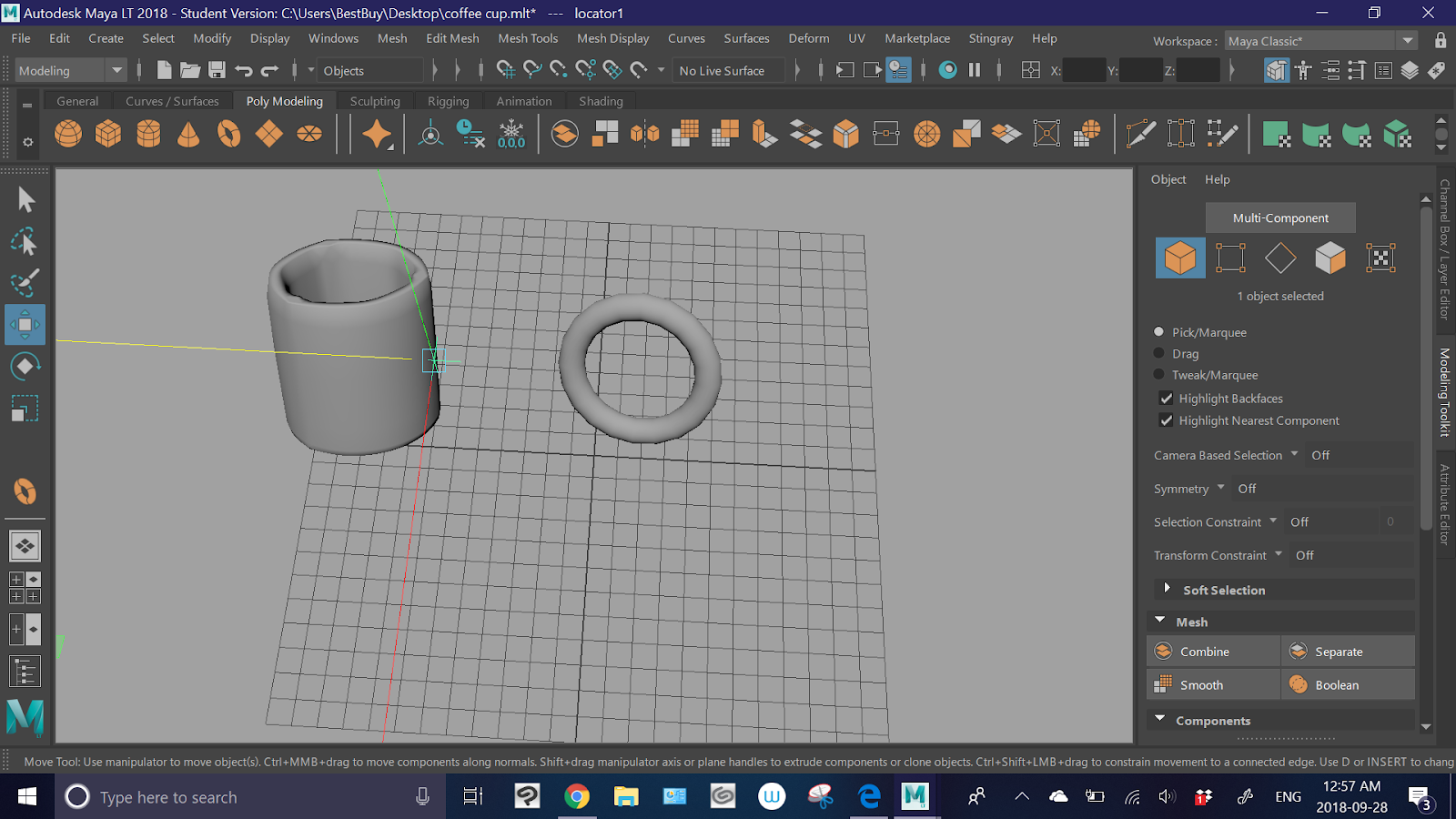


-I found a tool that allows you to create area markers
-using that I marked the coordinates the I wanted the handle to be in the pre-placed mug


-after that I selected the faces I didn't need for the handle

-used the delete key to delete the excess parts
-then used the combine objects button to fuse them


Problems:
-the fusion wasn't perfect, the ends of the donut poke through the cup

Solutions:
-I'll try and use some of the more complex modeling tools to edit it later

Stuff To Try Later:
-fixing the handle ends
-applying a material
-adding liquid inside


Wednesday, September 19, 2018

September 19th, 2018. Program: Maya

Work Notes:

Stuff Done:
-I started making a coffee cup
-I created a flat circle surface


-I used the extrude tool to raise it into a poly model


-I then used the shift key to multi select the separate parts of the surface, around the edge of the top of the cylinder
-using the extrude tool again I raised the edge


-then I used the smooth tool


-I just need to add the handle

Problems:
-I couldn't find a way to adjust how close the camera is to the object with out changing the size of the object
-some of the edges on the cup are still really sharp

Solutions:
-I think later I'll go through the settings
-I can probably use the edge cut and add tools to fix that

Stuff To Try Later:
-create a handle
-fix up the edges
-change the material
-maybe add a liquid inside it

Short Cuts:
-Shift = multi select

Tuesday, September 18, 2018

September 18th, 2018. Program: Maya

Work Notes:

Stuff Done:
-I got the texturing to work on my home computer
-I spawned a simple cube poly model, then opened the hyper shade window. after that, instead of trying to add a new material to the poly model I edited the material already there.


 -all I did was change the colors and transparency

Problems:
-I haven't figured out how to use an image as a texture yet
-or how to add multiple textures

Solutions:
-EXPERIMENTATION!!!!!!

Stuff To Try Later:
-using images as textures

Monday, September 17, 2018

September 17th, 2018. Program: Maya

Work Notes:

Stuff Done:
-I worked with the hyper shade window again
-I tried to use the gold blinn material I made on the crown poly model I made Friday


Problems:
-I couldn't get it to work
-I tried to use the method given in the video from Friday, selecting the object the right hold clicking the material and selecting "assign material to selection". It didn't do anything though.

Solutions:
-I'm going to restart and try again
-as well as experiment a bit more
-maybe watch another tutorial

Stuff To Try Later:
-continue to work with materials


Friday, September 14, 2018

September 14th, 2018. Program: Maya


Video Notes:
-learning about materials
-materials = what an object is made of
-creating materials = shading
-you can create and edit materials through the hyper shade window
-you have multiple panels in the hyper shade window
         -a scene materials panel (has all the materials being used in the scene)
         -a create panel (has assets for material creation)
         -a work area (where nodes are displayed)
         -a property editor (for changing the properties of a material)
-lambert 1 is the basic material for all objects in Maya
-nodes = base components of a material
-shading network = connected nodes
-don't use the delete key on nodes
-there is a proper node delete button
-

Work Notes:

Stuff Done:
-I just played around in the hyper shade window


-I just messed with a simple blinn material
-first I used the property editor to change the colour


-then I edited the specular colour
-I also increased the reflectivity


-making a gold material

Stuff To Try Later:
-applying this material to a poly model

Thursday, September 13, 2018

September 13th, 2018. Program: Maya

Work Notes:

Stuff Done:
-Just experimenting
-accidentally made a really cool crown


-you can edit the width, length, and quantity of divisions for the extruded vertex points after clicking extrude


Problems:
-I tried and failed to add a gold color texture to the crowns surface

Solutions:
-I'm going to try and find a video on how to add textures to poly models

Stuff To Try Later:
-texturing
-making more complicated poly models


Wednesday, September 12, 2018

September 12th, 2018. Program: Maya

Work Notes:

Stuff Done:
-I worked with the modeling tool kit
-figured out how to use the multi cut tool to create edges
-figured out how to get rid of edges using the target weld tool
-the quad draw tool basically allows you to move selected components
-figured out how to create edges through the connect tool

-enter = finish action (I think?)
-I worked with the nerve tools again
-I figured out how to attach separate nerves

Problems: 
-I tried to work with the loft nerve tool but I still have no clue

Solutions:
-more experimentation

Stuff To Try Later:
-making more complex poly models

Short Cuts:
-Enter = finish action