So this month has been interesting, I started off by finishing an already started character design. I Tried out a new style of shading using gradients to add depth. I'd never tried this before and it worked really well.

My next project in the month was a simple 3D model jumping animation. I created the key frames easily. However, when I put the frames in the animation folder I rasterized them, so when I went to create the sub frames I had to recreate the model pose then use that to get the sub frame. This took way too long, so I had to remake the animation, this time keeping a copy of the 3D model. It worked a lot better.

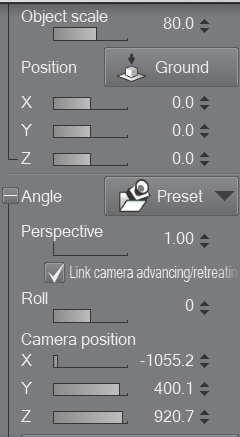
My next project was once again a 3D model animation, this time I did a character jumping and doing a spin kick. For this animation I decided that doing the key and sub frames seperately took way too long so I just did them together. During this animation I also discovered that instead of using the object position and camera perspective controls to keep the model position synced. I could instead use them to follow the models motion. Getting the timing of this animation was the most difficult part. The kick couldn't be too fast or too slow, and the run had to be smooth, I had to edit the timeline 6 times before it was good.
After the 3D animations I decided to do a 2D animation, based on the song
Gravity by Defences. This project took the rest of my month with multiple posts being taken up by each process of the animation. These being the story board, rough sketch (for this part I used some 3D models to define some of the action frames), the good sketch, fine lining, coloring, and finally the shadows and highlights.

The story boarding was difficult due to the songs timing needing to be constantly synced up with the animation.
The rough sketch was simpler but I had trouble getting the action scenes right so I tried using 3D models to get the poses defined. This was a great success but it was difficult in it's own ways.
In the good sketch I defined the character expressions more, made things a bit smoother, added more in between frames, and got rid of the 3D models.
The fine line version I...
In between a couple of the 2D animation posts I did a post about an online webinar I had watched on the benefits of Clip Studio Paint. A lot of useful stuff was shown, such as how to use vector layers.
I got a lot of stuff done this month as well as learned a ton so I'm pretty happy, Next month I'll be trying to create my first web comic so that should be interesting.

 Starting with the background, since this first chapter is in a nightmare I want it to have a creepy feel to it so I'll be trying a new tool I downloaded. I downloaded it through Clip Studio's asset store, to download stuff you need to open the separate program that comes with Clip Studio Paint, Clip Studio. Once open you just click on the asset store button, then the asset you want, and click download. It's super simple, I tend to find way too many cool assets using this. For brushes you go to the materials panel in Clip Studio Paint and drag the material to you brush panel then it's ready for use. I'm using a brush that does a gradient thickness crosshatch design.